
Blamcon In-Gun Menu
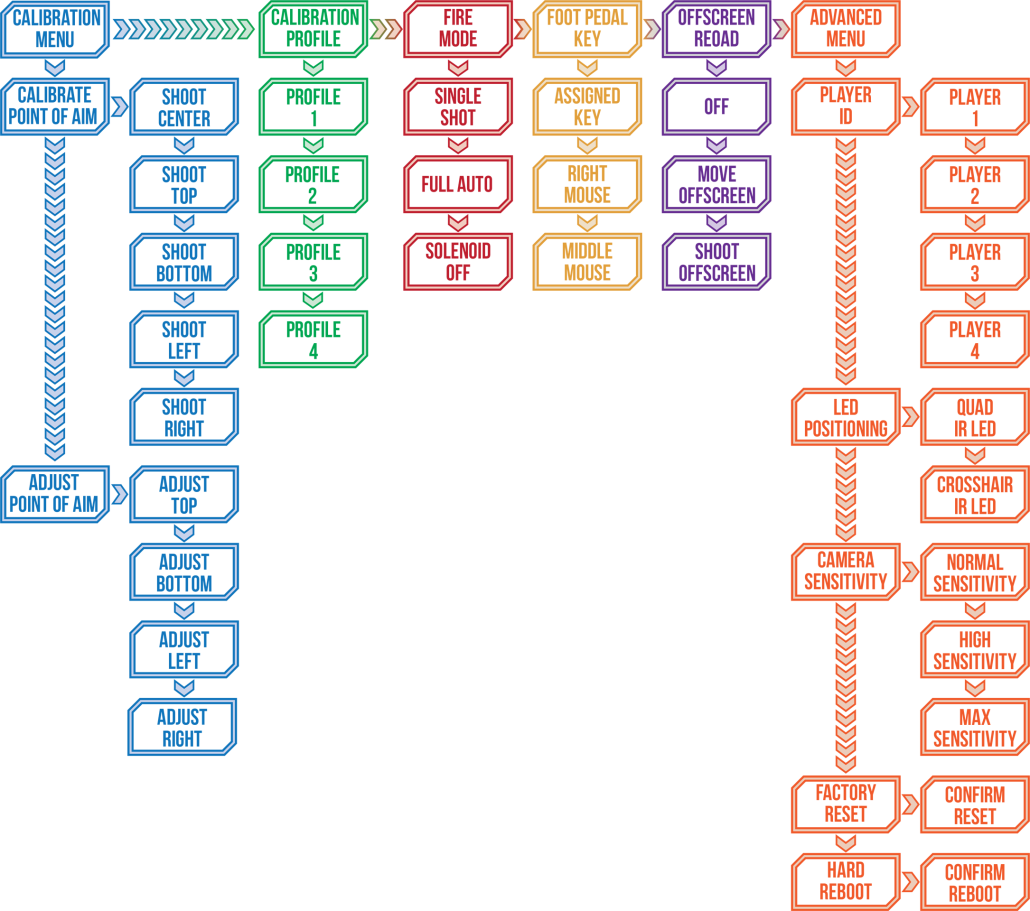
The Blamcon In-Gun menu allows you to set up your Blamcon without the need of software. You can use this to set up your Blamcon without using ARC, in Batocera, on Mac. You can also use this feature to calibrate your gun in game if the aspect ratio changes or you need the last bit of accuracy.
Using the In-Gun Menu System
Hold the B button while pointing the light gun offscreen to enter the menu, the light gun should vibrate once and the LED will light up.
The A button will move you to the next menu item.
The B button will move you back one menu level.
The Trigger button will move you to the next menu level or will accept the current selection.
At any time, hold the B button for 4 seconds to exit the menu without making any changes.
Menu areas are color coded. Moving forward will change sections. Pressing the trigger will enter a sub-menu. Sub-menu items are coded by flashes, so 1 flash for the first item, 2 flashes for the second, etc. Pressing the trigger on a sub-menu item will save your selection and exit the menu. If you reach the end of a menu, it will cycle back to the first item.
Calibrate point of aim – Aim the light gun and shoot the cursor or crosshair at each of the 5 points exactly. At each point, you want the light gun LED to be green or blue so it can see all four LEDs, blue means the IR LEDs are not square in the camera view, tilt the gun slightly until the LED is green. If the LED is yellow then check your distance, otherwise check your IR LED installation. The light gun will save your settings in the current profile and exit when you are done.
Adjust point of aim – Offsets dial in your point of aim for pixel perfection. If your tracking is not perfect after calibration, you can use the offsets to adjust the accuracy. Aim offscreen, and your cursor or crosshairs will snap to the first point you are adjusting for. Aim at that point, adjust your offset, and press the trigger to accept and save. When adjusting the offset for the top and bottom points, use A to move up and B to move down. When adjusting the offset for the left and right points, use A to move left and B to move right. When you have adjusted all four points, the light gun will save and exit.
Learn more about pre-built Blamcons or building your own. Or why not check out the store?