
Blamcon Buddy User Guide
This guide explains what the Blamcon Buddy is, how it works with your Blamcon Lightgun, and how to pair, reconnect, and re-pair the two devices.
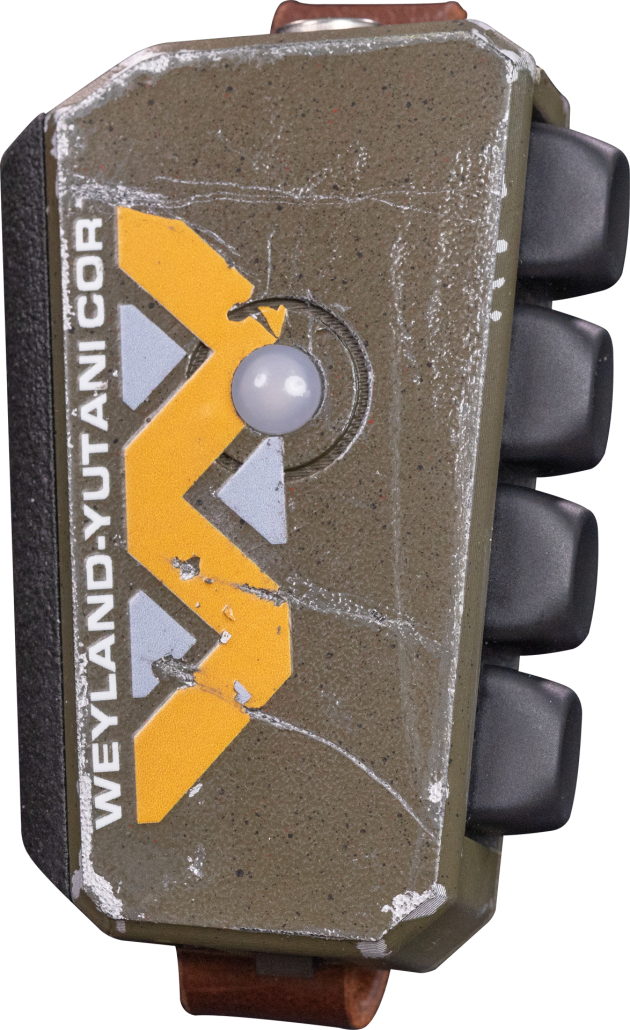
What is the Blamcon Buddy?
Blamcon Buddy is a wireless companion controller that connects to the Blamcon Lightgun and provides extra inputs (face buttons, Start/Select, and D-Pad).
The lightgun acts as the Bluetooth host — it scans for, connects to, and receives input reports from the Buddy. Buddy inputs are merged into the gun's normal button logic.
What Buddy adds
- Extra control inputs for games that need more than trigger-only interaction
- Wireless secondary controls without a separate USB controller
- Configurable input routing (you can remap Buddy inputs to different gun actions)
First time pairing:
- Power on Buddy — LED blinks blue (discoverable, waiting).
- Power on Lightgun.
- Hold A+B on the Lightgun for ~3–6 seconds until the LED turns dark blue.
- Wait for both LEDs to flash green — you're connected.
- Play.
Daily use (already paired):
- Power on both devices in any order.
- They reconnect automatically — no button presses needed.
- Expect a connection within ~5–10 seconds. The Lightgun keeps trying silently for up to 5 minutes.
If they don't connect after ~5 minutes:
- Hold A+B on the Lightgun to manually trigger pairing.
- Make sure the Buddy is powered on and its LED is blinking blue.
If connection drops mid-session:
- The Lightgun retries automatically (up to 3 times, ~7 seconds total).
- If all retries fail, hold A+B on the Lightgun to re-trigger pairing.
To switch to a different Buddy:
- Hold A+B on the Lightgun while powering on → LED turns solid red → releases to normal boot.
- Hold X+RB on the Buddy while powering on → LED turns solid red → releases to blue blink.
- Follow the first-time pairing steps above.
The very first time you use a Buddy with a Lightgun, both devices need to discover each other.
Timeout: 12 seconds. On failure → LED: OrangeRed 6x blink (Gun)
On failure, auto-reconnect is NOT scheduled — retry A+B manually
Steps:
- Power on your Buddy.
- Power on your Blamcon Lightgun.
- On the Lightgun, hold A + B for ~3–6 seconds until the LED turns dark blue.
- The Buddy LED blinks blue (discoverable, waiting for the Gun).
- When connected, both LEDs flash green, then return to normal play mode.
After a successful pair, both devices remember each other. You won't need to repeat this for normal daily use.
Once paired, devices reconnect automatically. Power them on in any order.
Boot-time background connect
When the Lightgun powers on with a saved Buddy address, it silently attempts to reach the Buddy without blocking the main loop:
"Silent" means: if direct-dial fails, no scan is attempted.
Because the Lightgun keeps trying for up to 5 minutes, power-on order does not matter. Power them on whenever you're ready — they will find each other.
Drop-recovery reconnect
When a connected Buddy drops unexpectedly mid-session:
Jitter (0–255ms) prevents the two devices retrying in lockstep.
Direct-dial fast path
Once a Buddy address is saved, the Lightgun skips the Bluetooth inquiry scan and dials directly. This reduces connect time from 4–12 seconds (scan) to approximately 1–2 seconds.
To forget the current Buddy and pair with a new one, clear pairing on both devices.
Hardware clear (no ARC needed):
- Lightgun: Hold A + B while powering on. LED turns solid red for ~1.5s, then boots normally.
- Buddy: Hold X + Right Shoulder while powering on. LED turns solid red for ~1.5s, then boots in discoverable mode.
Software clear:
- Use Forget Device in ARC.
Lightgun LED states
| LED | State | Meaning |
|---|---|---|
| Solid Red (~1.5s on boot) | Clearing pairing | A+B held at power-on — wiping stored data |
| Dark Blue blinking | Pairing/Scanning | Actively searching for Buddy (inquiry scan) |
| Green pulse (3s) | Connected | Pairing succeeded |
| OrangeRed 6x blink | Failed | Scan timed out — no Buddy found |
| Off (black) | Disconnected | Unexpected drop — drop-recovery scheduled |
| No change | Background connect | Silent direct-dial in progress (background) |
Buddy LED states
| LED | State | Meaning |
|---|---|---|
| Solid Red (~1.5s on boot) | Clearing pairing | X+RB held at power-on — wiping stored data |
| Blue blinking | Connecting | Discoverable & waiting (no saved host) |
| Blue blinking | Auto-reconnect | Has saved host — dials Gun directly |
| Green pulse (4s) | Connected | Pairing or reconnect succeeded |
After a successful pair, the Lightgun stores the Buddy's Bluetooth address and prefers that device on all future connections — including after reboot. This prevents accidentally connecting to a different nearby Buddy.
Once paired, the Buddy becomes non-discoverable (connectable only). It will only respond to the known Lightgun's direct-dial and will not appear in Bluetooth scans. This prevents other Lightguns from accidentally pairing to it.
The Buddy becomes discoverable again only after pairing is cleared (X+RB at boot or hardware equivalent).
Use Forget Pairing (ARC → Forget Device, or hold A+B at power-on) to clear this lock when switching devices.
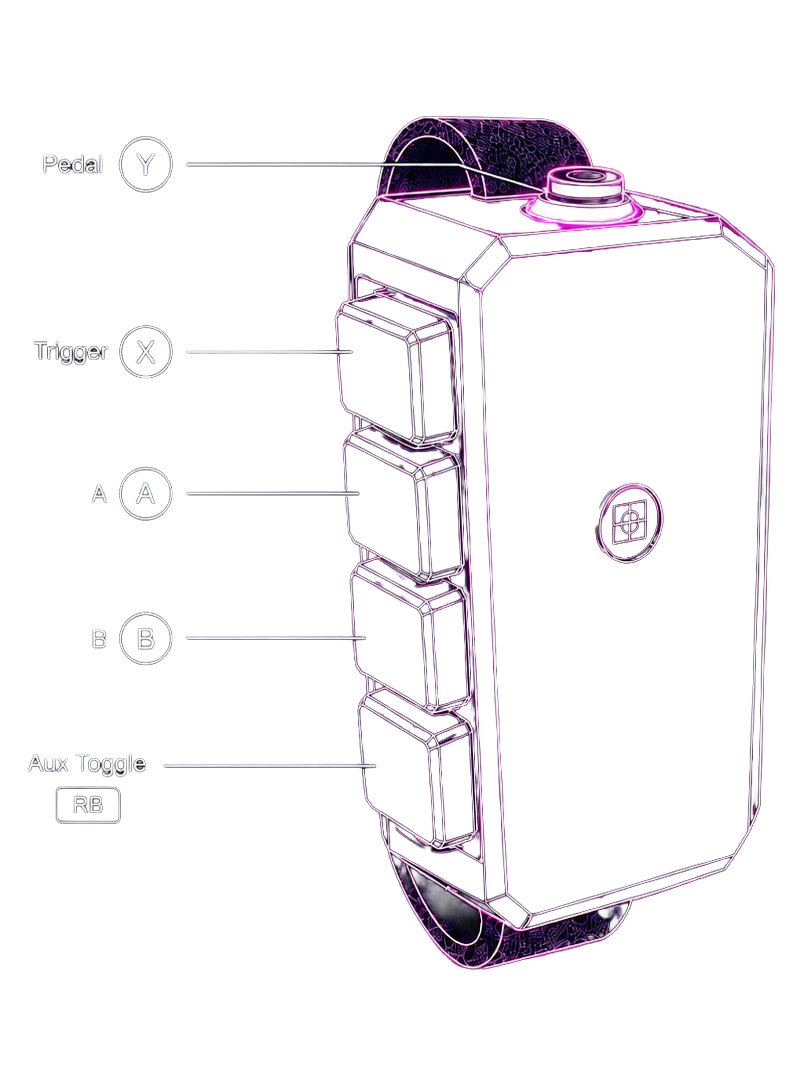
Buddy inputs are routed through a configurable map so each Buddy button can trigger the action you prefer. You can adjust input bindings in ARC under Buddy Input Bindings.
Default binding profile
| Buddy Button | Gun Action |
|---|---|
| X | Trigger |
| A | A |
| B | B |
| Y | Pedal |
| RB | Aux |
| Start | Start |
| Select | Select |
| Hat Up/Right/Down/Left | D-Pad Up/Right/Down/Left |
What Bluetooth devices will my Blamcon Lightgun pair with?
Blamcon Lightguns only pair with the Blamcon Buddy. During the pairing scan, the Lightgun looks exclusively for devices with a Joystick classification and then verifies the device name matches "Blamcon." It will not pair with other Bluetooth controllers or accessories.
How do I pair my Lightgun and Buddy?
You have two options to start pairing on the Lightgun:
- Button action: Hold A+B for about 6 seconds while pointing the camera offscreen.
- ARC UI: Use the pairing option in the Blamcon Advanced Remote Console.
The Blamcon Buddy automatically enters pairing mode every time it powers on, so just turn it on and it will be ready.
How do I know when both devices are paired?
Both devices use their LEDs to indicate status:
- Lightgun: The LED flashes blue while in pairing mode. Once paired successfully, it flashes green for a few seconds and then turns off for gameplay.
- Buddy: The LED flashes blue while in pairing mode. Once paired, it turns solid green for 3–4 seconds and then turns off.
How do I know if pairing failed?
The pairing process allows 60 seconds to scan for a Blamcon Buddy, plus another 60 seconds to complete the connection. If pairing fails:
- Lightgun: The LED flashes red for a few seconds and then turns off.
- Buddy: The LED continues flashing blue until a successful connection is made.
You can also check the ARC UI, which displays the current Bluetooth connection status and whether the pairing process can be restarted.
How do I know if the devices are no longer paired?
There are a few signs that the devices have disconnected and are no longer paired:
- The Blamcon Buddy LED is flashing blue.
- The ARC UI reports the Bluetooth connection status as disconnected.
- The Blamcon Buddy buttons no longer work in-game.
My Buddy won't connect on first power-on
The Lightgun background connect window runs for 5 minutes after boot. If the Buddy wasn't on yet, just power it on — the Lightgun will connect automatically within ~60 seconds.
If nothing happens after 5 minutes, hold A+B on the Lightgun to manually trigger pairing.
My Buddy won't connect at all
- Open ARC and check that Enable Pairing is on.
- If stuck, toggle Enable Pairing off then back on.
- If still failing, use Forget Device in ARC on the Lightgun, and hold X+RB at boot on the Buddy, then re-pair from scratch.
Reconnecting seems slow
- The first reconnect after a drop should take ~1–2 seconds (direct-dial fast path).
- If you see 4–12 second delays, the saved Buddy address may have been cleared — a fresh pair will restore fast reconnects.
The wrong Buddy buttons are triggering in-game
- Open ARC → Device Info → check connection status.
- Open Buddy Input Bindings and inspect the route assignments.
- Adjust one input at a time and test.
- If needed, restore defaults and start again.
I'm seeing unexpected reconnect behavior
- Drop-recovery reconnect is only triggered by unexpected drops from an active connection.
- Explicitly disconnecting via ARC cancels reconnect state and disarms the background connect window.
- If all 3 drop-recovery attempts fail, hold A+B on the Lightgun to re-trigger pairing.
How do I switch to a different Buddy?
Follow the Reset and Re-Pair flow above. Both devices must have their pairing cleared for a clean fresh pair.